Notifications (Teams & e-mail)
Every run tells the team what happened, so nobody has to watch the terminal or the CI log. The framework posts a card to Microsoft Teams (and/or a message to Slack) for each distribution, and e-mails an HTML report after each AI test run.
What you will receive
| Message | Sent when | Channel | Configured in |
|---|---|---|---|
| Build Distributed | distribute finished successfully | Teams card / Slack text | notifications in environments.yml |
| Distribution Failed | any step of a distribution fails (build, upload, testers…) | Teams card / Slack text | same |
| App Testing Agent Report | the App Testing agent finished (passed or failed) | Teams card / Slack text | same |
| AI test report e-mail | the App Testing agent finished | E-mail (HTML + plain text) | notifications.email in testing.yml + SMTP_* |
Pick a message to see exactly what it looks like:
- Platform
- Android
- Environment
- STAGING
- Version
- 1.4.0
- Build
- 57
- Artifact
- MyApp-staging-v1.4.0-57.apk
- Branch
- main
- Commit
- c72edba
- Triggered By
- sujay-k
GITHUB_SERVER_URL, GITHUB_REPOSITORY and GITHUB_RUN_ID exist. Local runs show “Triggered By: Local run”.Step 1: Create a Teams Workflows webhook
Create the Workflows webhook that receives build and test reports.
winget install Microsoft.TeamsMicrosoft retired Office 365 connectors in favour of Workflows (Power Automate). The framework posts to a Workflows webhook URL, as described in Microsoft: create incoming webhooks with Workflows.
The screenshots below are from the Teams desktop app. Pink numbered boxes mark what to click, in order.
- 1
Open the Workflows app
In the left rail select ⋯ (View more apps) ①, typeWorkflowsand open it ②.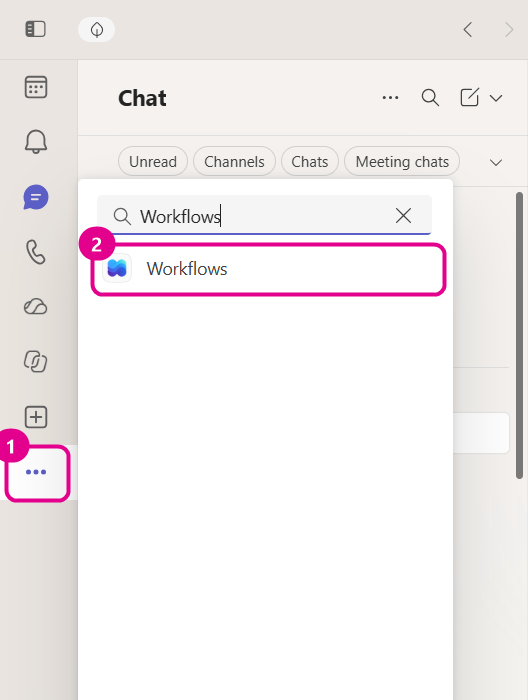
View more apps → search “Workflows” → open it. - 2
Open the templates
On the Workflows Home tab, select Templates ①. If you want to post to a team channel, you can also start straight from the Send webhook alerts to a channel card.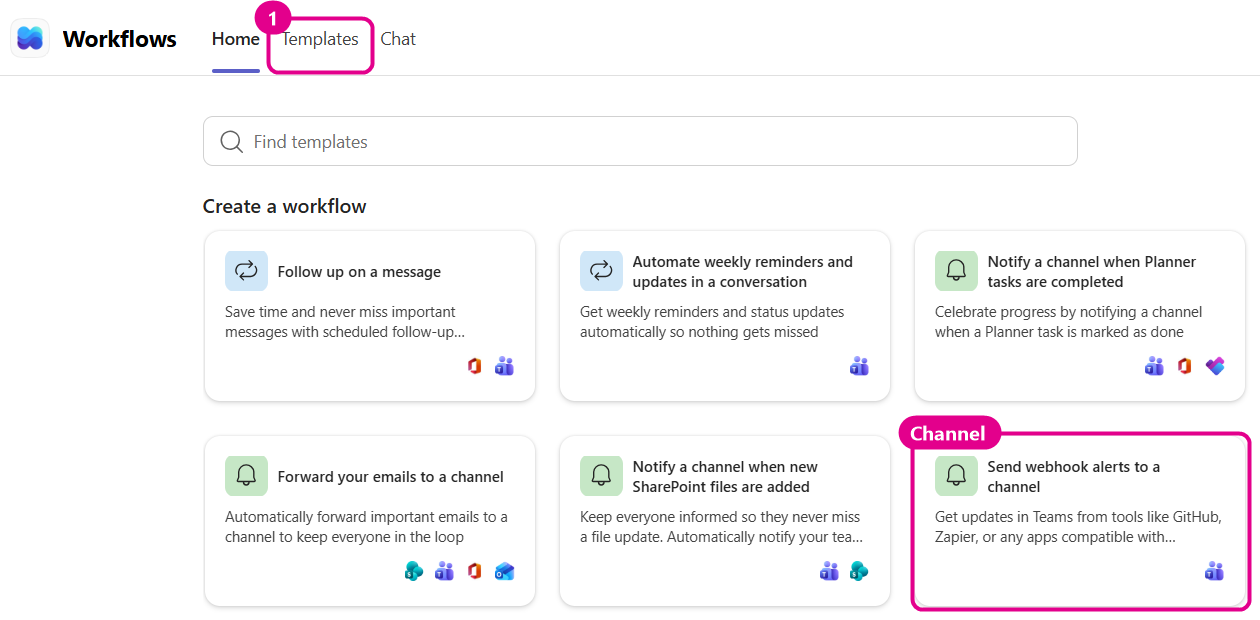
Templates tab, or the channel template directly from Home. - 3
Choose where the alerts should go
Pick Send webhook alerts to a chat to post into a group chat (or your own chat while testing), or Send webhook alerts to a channel to post into a team channel. Older tenants call the channel template Post to a channel when a webhook request is received.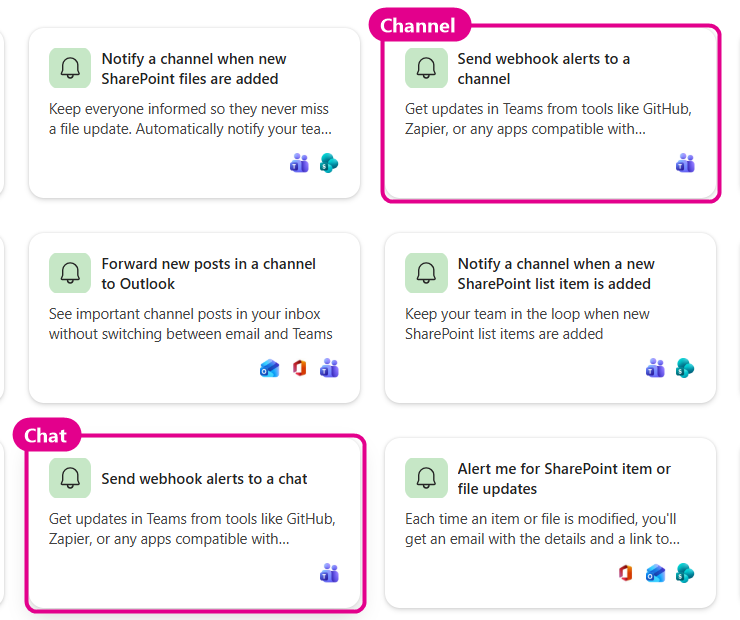
Chat = a group chat; Channel = a team channel. Both give the same kind of webhook URL. - 4
Select the chat (or team and channel), then Save
Open the Chat drop-down ① and pick the conversation that should receive release cards. Then select Save ②. For the channel template you pick a Team and a Channel instead.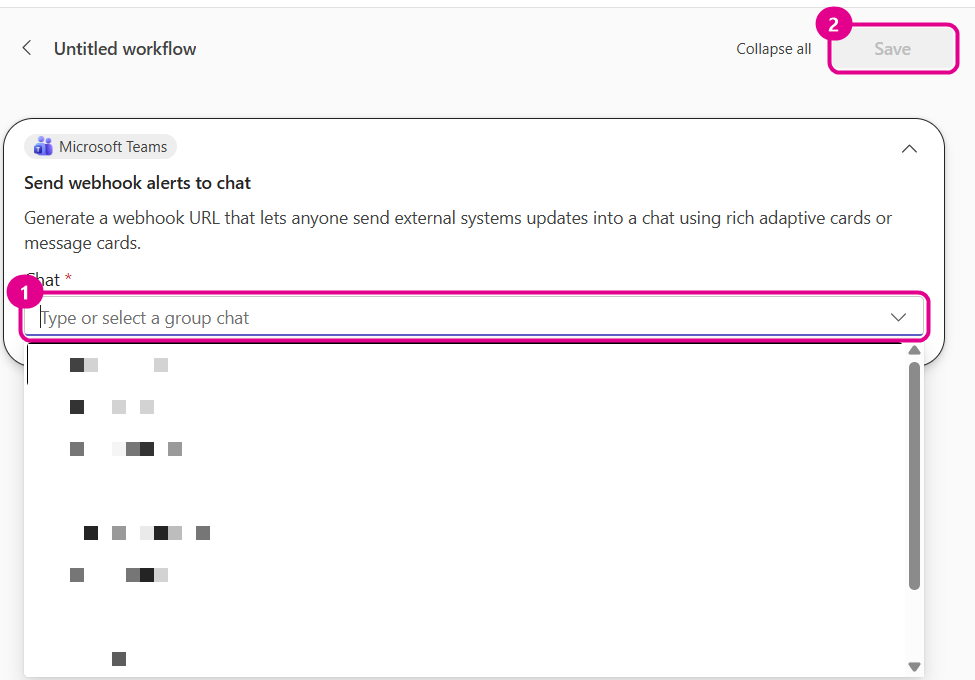
Names in the list are blurred for privacy. - 5
Copy the webhook link
Teams shows “Workflow created” and opens Workflow details. Select Copy webhook link ①. You can come back to this page any time from Workflows → Home → Your workflows.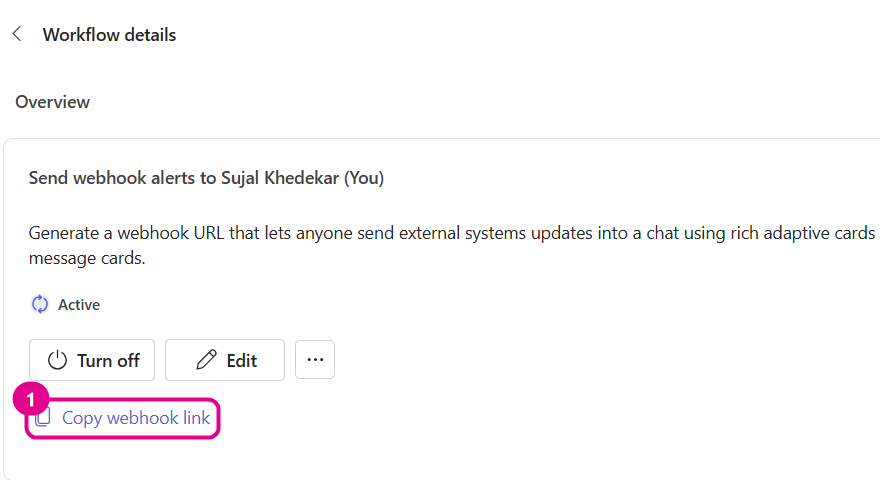
The link is copied to your clipboard. Hovering it shows the full URL. Never screenshot or share that URL. - 6
Save it as TEAMS_WEBHOOK_URL
On GitHub Actions, add the same value as a repository secret (GitHub: using secrets)..envTEAMS_WEBHOOK_URL=https://prod-12.westeurope.logic.azure.com:443/workflows/.../invoke?api-version=2016-06-01&sp=...&sv=1.0&sig=...
sig= part of the URL is a secret: anyone with the URL can post to your channel. Keep it in .env or CI secrets only. If it leaks, delete the workflow and create a new one.Step 2: Enable it in environments.yml
Set the global defaults once, then switch channels on or off per environment:
notifications:                       # global defaults  teams: { enabled: true,  webhook_url: "${TEAMS_WEBHOOK_URL}" }  slack: { enabled: false, webhook_url: "${SLACK_WEBHOOK_URL}" }
android:  environments:    development:      notifications:        teams: { enabled: false }      # keep dev builds quiet    production:      notifications:        teams: { enabled: true }
An environment's notifications block is deep-merged over the global one, so you only write what changes.
Step 3: Test the webhook
Send a test card before your first real run. A Workflows webhook accepts only Adaptive Card payloads. Plain { "text": … } fails with “Property 'type' must be 'AdaptiveCard'”. The framework always sends cards.
# Load the URL into this session (PowerShell does not read .env)PS C:\my-app> $env:TEAMS_WEBHOOK_URL = "https://prod-12.westeurope.logic.azure.com:443/workflows/..."PS C:\my-app> $card = @{ type="message"; attachments=@(@{ contentType="application/vnd.microsoft.card.adaptive"; content=@{ type="AdaptiveCard"; version="1.4"; body=@(@{ type="TextBlock"; text="Fastlane webhook test"; weight="Bolder" }) } }) } | ConvertTo-Json -Depth 10PS C:\my-app> Invoke-RestMethod -Uri $env:TEAMS_WEBHOOK_URL -Method Post -ContentType "application/json; charset=utf-8" -Body ([Text.Encoding]::UTF8.GetBytes($card))# No output = HTTP 202 Accepted. The card appears in the channel within a few seconds.curl -sS -o /dev/null -w "%{http_code}\n" -X POST "$TEAMS_WEBHOOK_URL" \ -H "Content-Type: application/json" \ -d '{"type":"message","attachments":[{"contentType":"application/vnd.microsoft.card.adaptive","content":{"type":"AdaptiveCard","version":"1.4","body":[{"type":"TextBlock","text":"Fastlane webhook test","weight":"Bolder"}]}}]}'# → 202During a real run the result is logged right after the lane finishes:
~/my-app $ bundle exec fastlane android distribute environment:staging...[14:07:01]: Microsoft Teams notification sent (HTTP 202).[14:07:01]: Fastlane completed successfully: distribute[16:08:34]: Notification integration failed: Microsoft Teams webhook returned 401: ... — the webhook URL's signature (sig=) was rejected: the URL is incomplete or outdated. Copy the full URL again from the Power Automate trigger and update the webhook secret/env value.Step 4 (optional): Slack
Create a Slack app with an incoming webhook for your channel, put its URL in SLACK_WEBHOOK_URL and set notifications.slack.enabled: true. Slack receives the plain-text version of each message (see the Slack tab above).
Step 5: E-mail the AI test report
After every App Testing agent run, the framework e-mails the HTML report shown above. It uses plain SMTP, so any provider works: Microsoft 365, Gmail (with an app password), Amazon SES or SendGrid.
| Variable | Required | Purpose |
|---|---|---|
SMTP_HOST | Required | e.g. smtp.office365.com, smtp.gmail.com. If empty, e-mail is skipped with a warning. |
SMTP_PORT | Optional | 587 (STARTTLS, default) or 465 (implicit TLS) |
SMTP_USERNAME / SMTP_PASSWORD | Usually | SMTP login. For Gmail and Microsoft 365 use an app password. |
SMTP_FROM | Recommended | Sender address, e.g. Fastlane CI <ci@example.com> |
TEST_ALERT_EMAIL_RECIPIENTS | Required | Comma-separated recipients |
notifications: email: enabled: true notify_on_success: true # set false to e-mail only failures notify_on_failure: true recipients: "${TEST_ALERT_EMAIL_RECIPIENTS}"[14:10:13]: [EmailNotifier] Test report email sent to qa-lead@example.com, dev-team@example.com[14:10:13]: [EmailNotifier] SMTP_HOST not set; skipping email alert.test_case_ids.yml. The agent fails, and a red “Tests Failed” e-mail and card are sent.- Project Name
- MyApp
- Environment
- STAGING
- Build Number
- 57
- Execution Status
- FAILED
- Test Duration
- 3m 12s
- Failed Test Names/IDs
- login-flow
- Failed Devices
- a54x (API 34)
- Timestamp
- 07 Oct 2026, 14:10 IST
- login-flow
- first-test-case
model=a54x,version=34,…Troubleshooting
| Symptom | Fix |
|---|---|
| “Property 'type' must be 'AdaptiveCard'” | You are posting plain text to a Workflows URL. Use the Adaptive Card payload above. The framework already does. |
| Teams webhook returned 401 | The URL is incomplete or the workflow was recreated. Copy the full URL again, including sig=. |
| “Teams webhook URL is not configured.” | TEAMS_WEBHOOK_URL is empty, or the variable isn't set in CI secrets. |
| Card arrives, but no “View CI Run” button | Expected for local runs. The button needs GitHub Actions variables. |
| No e-mail | Check SMTP_HOST, the recipients, and notifications.email.enabled; look for [EmailNotifier] lines in the log. |
| Gmail: 535 Authentication failed | Use an app password, not the account password. |
Official documentation
- MicrosoftCreate incoming webhooks with Workflows for Microsoft Teamssupport.microsoft.com/en-us/office/create-incoming-webhooks-with-workflows-for-microsoft-teams-8ae491c7-0394-4861-ba59-055e33f75498
- MicrosoftAdaptive Cards schema and designeradaptivecards.io/
- SlackSending messages using incoming webhooksapi.slack.com/messaging/webhooks
- GitHubUsing secrets in GitHub Actionsdocs.github.com/en/actions/security-for-github-actions/security-guides/using-secrets-in-github-actions